
AI Video Editor: ShotCut AI
Shotcut Video WorkshopVideo Players & Editors
4.24.88K Reviews
- Version
- 3.8.0
- Installs
- 50.00M
- Age Rating
- Everyone
Screenshots
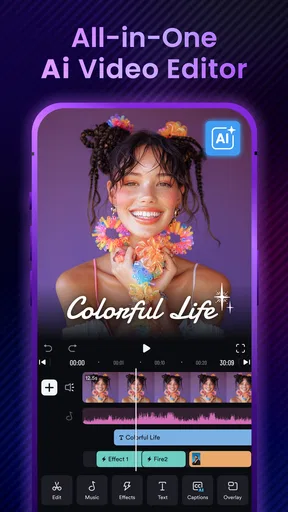
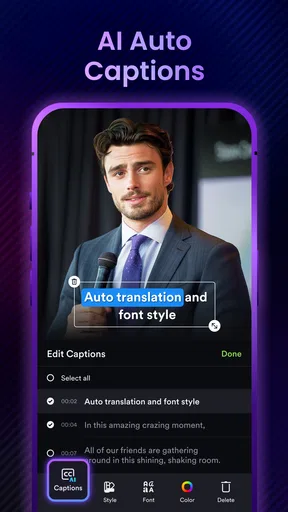
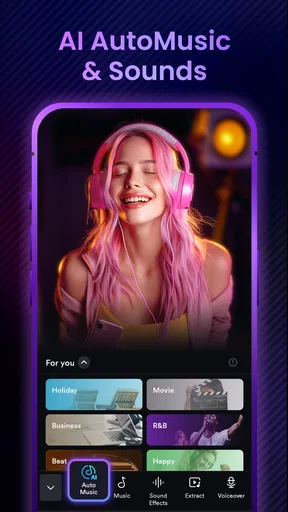
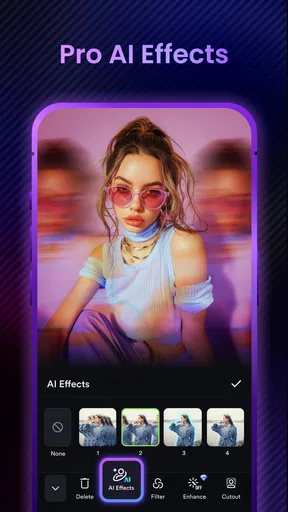
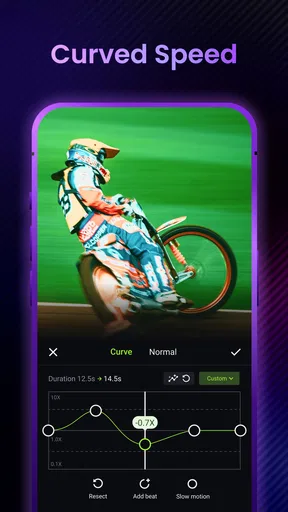
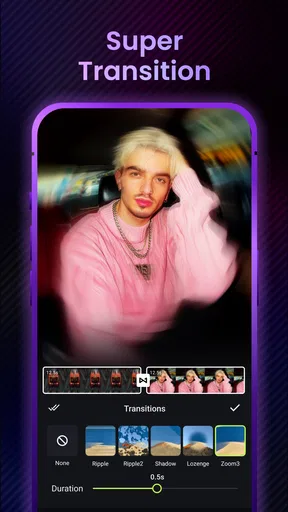
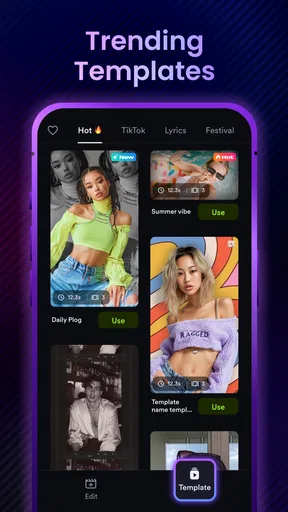
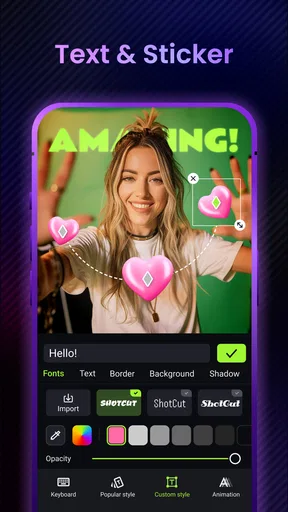
Our Review of AI Video Editor: ShotCut AI
 Analysis by Appyee
I look for a mobile editor that helps me finish a video without turning a small project into a long technical session. AI Video Editor: ShotCut AI makes an appealing case for that kind of work: it puts editing tools and AI assistance in a phone app, aiming to make the first cut less intimidating. My overall view is that it suits casual creators who want a guided starting point, but it is worth approaching its automated choices as suggestions rather than a substitute for your own eye.
Where a guided editor earns its place
The clearest advantage of an app like this is the way it can reduce the friction between recording a lot and making something watchable. A phone often holds scattered clips from a day out, a celebration, or a small project. Scene suggestions and automatic adjustments can help turn that collection into a first draft, which is useful when I want to share a memory without spending the evening learning a desktop editing workflow.
That convenience is most valuable at the beginning of a project. I would use automated scene choices to identify a possible structure, then review the result with the sound on and remove any cut that interrupts a sentence, reaction, or important moment. An algorithm may notice visual changes, but a person knows which small detail matters to the people in the video. AI works best as a quick assistant, not as the final editor.
A practical way to make a better first cut
For a family gathering, I would start by choosing a few clips that tell a simple story rather than importing every recording from the day. That small bit of selection makes any automatic edit easier to judge. I would then preview the suggested cuts, keep the moments that carry the event, and shorten the pauses that do not add anything. The result is more likely to feel personal than a montage assembled from every clip simply because it was available.
I would also treat automatic image enhancement as a starting point. A bright adjustment may help a dim indoor clip, but the same treatment can make a sunny scene look harsh or change the mood of warm evening light. Checking clips side by side is a useful habit: a consistent look across the finished video often feels more polished than applying the strongest enhancement to every shot.
Audio deserves the same careful pass. Suggested music can provide a useful direction, but I would listen for whether it competes with people speaking. For a video where a toast, story, or child’s voice matters, keeping speech clear is more important than matching a general mood. If the app’s automated treatment changes a voice in a way I dislike, I would prefer a simpler soundtrack or a more restrained adjustment.
Choosing it over a more hands-on editor
Compared with a basic trim-and-share tool, an AI-focused editor is attractive when I want help shaping several clips into a coherent piece. It can be a more welcoming starting point than a traditional timeline with many controls, especially for someone who does not yet know how to plan cuts or balance an edit. On the other hand, creators who already enjoy placing every cut, adjusting each layer, and shaping a precise rhythm may prefer an editor built around detailed manual control.
The trade-off is not simply “easy” versus “professional.” Automation can save effort on routine choices, but it also asks me to inspect what it has done. A quick result is not automatically the right result, especially when timing, spoken words, or a particular facial expression carries meaning. If a project depends on exact pacing or a carefully controlled look, I would choose a workflow that makes those decisions easy to inspect and change rather than relying on a suggested edit.
Who is likely to enjoy it
I would point casual mobile creators toward ShotCut AI if they regularly record short moments and want a friendlier path from clips to a finished shareable video. It is a sensible fit for a holiday recap, a family montage, or a simple personal project where speed matters more than frame-by-frame control. Someone making occasional videos for friends may appreciate having editing assistance in the same place they keep their footage.
I would be more cautious about recommending it to a person who needs a strict production workflow, has a detailed edit in mind, or expects every automatic choice to be right on the first pass. A phone screen can also feel cramped when a project grows and there are many small decisions to make. For those users, a more manual editor—or a larger-screen workflow—may be less frustrating, even if it takes longer to learn.
First Impressions: Diving into ShotCut AI
The moment I opened ShotCut AI, I was greeted with a sleek and user-friendly interface. It’s got that clean design that invites you to start creating without feeling overwhelmed. The app doesn’t bombard you with a million options. Instead, it guides you step-by-step, which is a breath of fresh air.
Once you start a new project, you’re asked to import your clips. I love how it seamlessly integrates with your phone’s gallery, making it super easy to grab all those random videos you’ve been collecting. It even has cloud support, so if you’re like me and store everything online, you’re covered.
Editing Magic: AI Features Galore
Now, onto the editing. This is where ShotCut AI really shines. The app employs some seriously smart AI to help you out. It can automatically detect scenes in your clips and suggest cuts. It’s like the app knows exactly which parts of your long-winded vacation videos are actually interesting. It’s almost scary how accurate it is!
One of my favorite features has to be the auto-enhance tool. With just a tap, the app adjusts lighting, color balance, and even adds filters to make your footage look like it was shot on a high-end camera. And if you’re feeling creative, you can tweak these settings to your heart’s content.
Special Effects and Transitions
Feeling fancy? ShotCut AI doesn’t disappoint in the effects department either. It has a decent library of transitions and special effects that you can easily drag and drop into your timeline. Whether you’re going for a cinematic feel or a quirky vibe, there’s something for everyone.
The AI also assists in picking the best transitions based on your video’s content. I noticed it suggested smooth fades for a sunset scene, which looked absolutely stunning. It’s like having a virtual director guiding your hand.
Audio Editing: Not an Afterthought
Audio can make or break your video, and ShotCut AI knows that. The app allows you to add music tracks, sound effects, and voiceovers with ease. The AI even helps to sync your audio with the visuals. I was pleasantly surprised by how well it handled background noise reduction, making my voiceovers sound crisp and clear.
There’s also a nifty feature that suggests background music based on the mood of your video. I tried it out with a family gathering clip, and the cheerful tune it picked was spot on.
Exporting and Sharing
Once you’ve perfected your masterpiece, exporting is a breeze. ShotCut AI offers various resolution options, including HD and 4K, so your videos look sharp no matter where you post them. The app also provides direct sharing options to social media platforms, which is perfect for those quick uploads.
I especially appreciated the ability to save my project to the cloud. This means I can come back and tweak it anytime, anywhere. It’s a huge plus for those of us who are constantly on the go.
The Verdict: Is ShotCut AI Worth It?
In a word: absolutely. AI Video Editor: ShotCut AI is a game-changer for both amateur and seasoned video editors. It combines powerful AI features with an intuitive interface that makes video editing not just easy, but genuinely enjoyable.
So whether you’re piecing together a family vacation montage or crafting the next viral video, ShotCut AI has got you covered. It’s like having a personal video editor who works 24/7 without complaining. Give it a try, and you might just find yourself editing more than you ever thought you would!
What to know before installing
ShotCut AI is a free app in the video editing category, developed by Shotcut Video Workshop. It has an average rating of 4.3 from around 373,000 ratings, with roughly 4,800 written reviews and over 50 million installs. The app is rated for Everyone, and its current version is 3.2.1; it requires Android 8.0 or later. Those figures suggest a widely used option, but they cannot tell you whether its editing style suits your own projects.
There is an important cost distinction to keep in mind: the app is free to download, while in-app purchases range from $0.99 to $119.99 per item. I would start with the free experience and decide whether the tools you actually need are available before paying for anything. If a purchase appears during setup or while exploring an effect, read its terms carefully and consider whether it solves a recurring need rather than a one-off curiosity.
The developer’s name and the app’s “AI” positioning do not, by themselves, answer practical questions such as which tools are available without payment or whether a particular export fits a platform’s requirements. I would check those details in the app before building an important project around them. That is especially sensible if you are editing for a deadline, since switching tools halfway through can mean repeating work.
Small workflow choices that save time
One useful habit is to decide the intended destination before editing. A short vertical clip for a social feed and a longer video meant to watch on a television call for different framing and pacing. If I settle on the audience first, I can choose footage that suits the purpose and avoid polishing a sequence that later needs to be rebuilt around a different format.
I would also keep the original recordings untouched until I have watched the finished export. That gives me a fallback if a crop, enhancement, or cut removes something I want to restore. For a project with several similar clips, a quick pass to pick the strongest take before adding effects can be more useful than decorating every option and deciding afterward.
When a video includes both speech and music, I would preview it on the phone speaker as well as with headphones. A mix that sounds balanced through headphones can make quiet speech hard to hear on a small speaker. This simple check helps catch a common mobile-editing problem before sharing, without requiring a complicated audio workflow.
Where the balance lands
The main appeal here is the combination of a guided interface and AI-assisted editing, not a promise that every project will become effortless. I see it as a practical choice for everyday videos when I want help getting from raw footage to a presentable draft. Its strongest fit is someone willing to review the automated decisions and make a few personal adjustments.
For highly controlled work, a manual timeline editor may remain the better tool; for a one-tap trim, a simpler utility may be quicker. Between those extremes, ShotCut AI has a clear role for people who want more help than basic trimming but do not want to start with a complex editing setup. I would try it for a low-stakes personal video first, learn which suggestions I trust, and then decide whether it belongs in my regular editing routine.
Privacy and Permissions
See what permissions an app requests and how it handles your data.
- Calendar
- read calendar events plus confidential information, add or modify calendar events and send email to guests without owners' knowledge
- Phone
- read phone status and identity
- Photos/Media/Files
- read the contents of your USB storage, modify or delete the contents of your USB storage
- Storage
- read the contents of your USB storage, modify or delete the contents of your USB storage
- Camera
- take pictures and videos
- Microphone
- record audio
- Wi-Fi connection information
- view Wi-Fi connections
- Device ID & call information
- read phone status and identity
- Other
- view network connections, full network access, control vibration, prevent device from sleeping, Google Play license check, read Google service configuration
Verdict
Strengths of AI Video Editor: ShotCut AI
- Intuitive user interface design.
- Wide range of editing tools.
- AI-powered features enhance quality.
- Fast rendering and export times.
- Supports multiple video formats.
Limitations of AI Video Editor: ShotCut AI
- Limited free version features.
- Occasional crashes on older devices.
- In-app ads can be intrusive.
- Requires high storage space.
- Subscription model can be pricey.
Other Releases by Shotcut Video Workshop
View All
Video Downloader, Download All
Video Players & Editors4.5

AI Photo Generator: Muselab AI
Photography4.6

AI Video Generator: Collart AI
Photography4.6
Similar Picks in This Category
View All
Google TV
Google LLC3.9

iTunes
Apple4.7

YouTube
Google LLC3.8

MX Player
Amazon Mobile LLC4.2

CapCut - Video Editor
Bytedance Pte. Ltd.3.5

PLAYit-All in One Video Player
PLAYIT TECHNOLOGY PTE. LTD.4.5
Frequently Asked Questions
What features does AI Video Editor: ShotCut AI offer?
ShotCut AI provides a comprehensive suite of features, including AI-driven video editing tools, automated scene detection, and smart enhancements. Users can enjoy features like one-tap editing, customizable filters, and a user-friendly interface that supports both novice and experienced editors.
Is AI Video Editor: ShotCut AI suitable for beginners?
Yes, ShotCut AI is designed with beginners in mind. It offers intuitive controls and automated editing options that streamline the editing process, allowing users to create professional-looking videos without prior experience. Its user-friendly interface ensures ease of use for all skill levels.
What platforms is AI Video Editor: ShotCut AI available on?
AI Video Editor: ShotCut AI is available for both Android and iOS platforms. Users can download the app from the Google Play Store for Android devices and the Apple App Store for iOS devices, ensuring broad accessibility across popular mobile operating systems.
Does AI Video Editor: ShotCut AI require an internet connection?
While ShotCut AI can perform basic editing functions offline, an internet connection is recommended for accessing advanced features, downloading updates, and utilizing cloud-based storage. Some AI-powered functions may also require connectivity to function optimally.
Are there any in-app purchases or subscription fees?
AI Video Editor: ShotCut AI offers a free version with essential features. However, for access to advanced tools and premium capabilities, users may need to make in-app purchases or subscribe to a premium plan. This model allows flexibility depending on user needs and budget.
